

Turn it on
Open Preferences ▸ Alpha. Turn on Alpha features, then the feature you want: Dub FX channel or Following beat grid. Turn Alpha features off and every one of them is gone from the surface again.The DUB FX channel
With Dub FX channel on, each deck’s source switch gets a fourth position: INT · TC · THRU · DUB FX. Click DUB FX and the deck stops being a turntable. Its track is unloaded and the record is replaced by a rack of four vintage units, working on whatever your mixer sends it.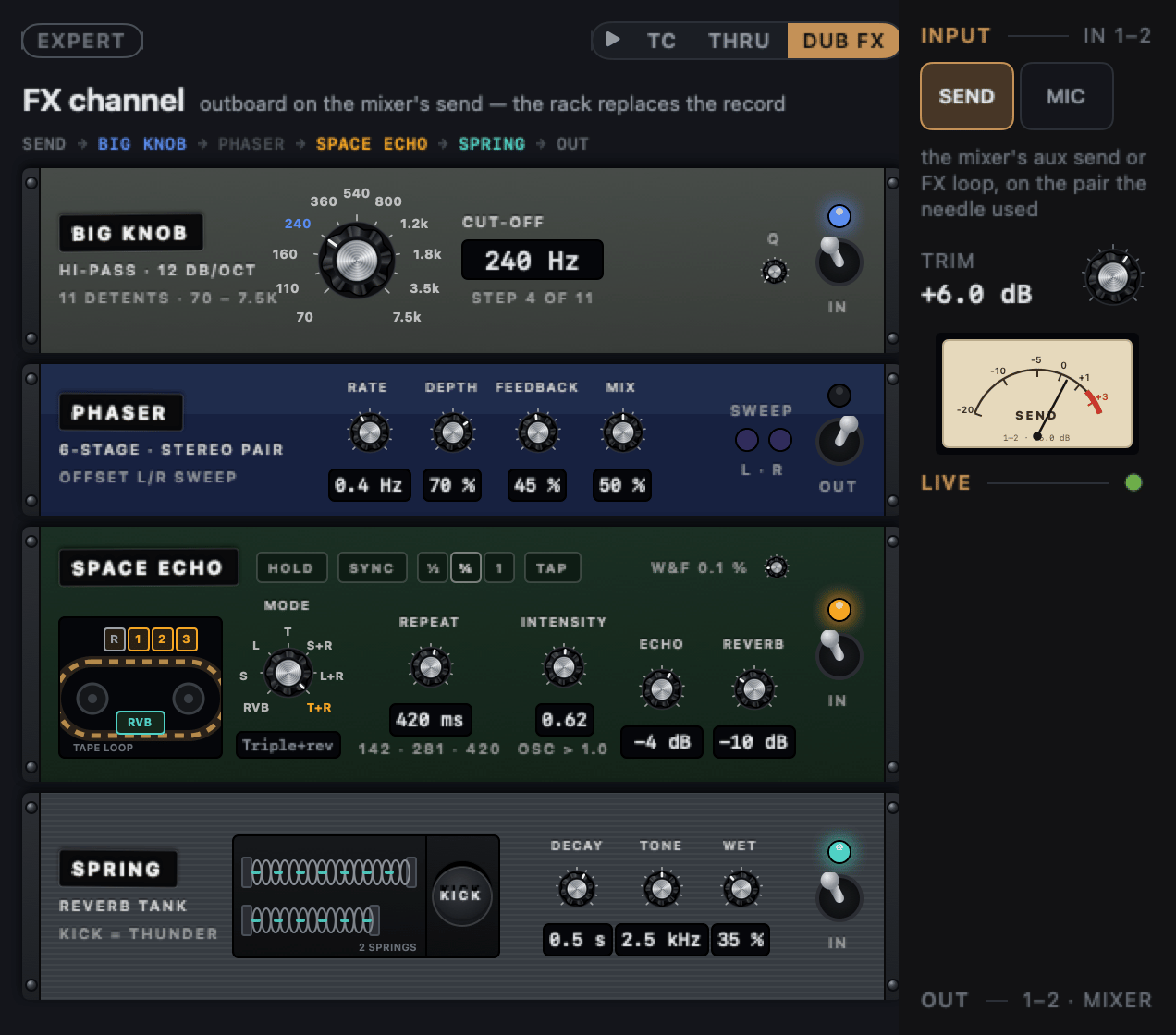
Patch it on the mixer
Dub doesn’t route anything inside itself. The mixer does:- In: patch the mixer’s aux send or FX loop into the input pair that deck’s needle used.
- Out: the rack returns on that deck’s output pair, into a mixer channel.
The input lane
The rack
The channel has one mode, EXPERT: every knob is the unit’s own control. The line under the title shows the signal path, each unit lit while it’s in. The units run top to bottom:
Each unit has an IN/OUT toggle. The channel starts with all four out.
A unit that’s out stays readable, so you can set it up first and then throw
it in.
On the SPACE ECHO, INTENSITY past 1.0 makes the tape feed itself and
the unit says RUNAWAY.
SYNC and TAP
SYNC puts the Space Echo’s repeats in time with the music. It takes the tempo from the other deck when that deck has one; otherwise from what you TAP. The unit shows where the tempo comes from, or No tempo · tap.- ½, ¾ and 1 set the longest echo to that much of a beat.
- TAP the beat a few times. A gap of more than two seconds starts a new count.
- Turning REPEAT by hand takes SYNC off.
Space Echo HOLD
HOLD on the Space Echo stops anything new going onto the tape and keeps the loop going, so the echo carries the room while you swap the record. Press it again to let the tape fade.The siren and samples into the rack
When the siren or the samples are sent to the deck that’s the FX channel, their output pill reads → FX: the siren plays through the rack.HOLD on a deck’s echo
With Dub FX channel on, each deck’s echo gets a HOLD button beside it, and ECHO OUT reads OUT. Echo out must be on in Preferences ▸ FX. This is the one-turntable dub transition:1
Throw the echo
Press OUT on the record that’s playing.
2
Press HOLD
The last beat sustains instead of dying away. HOLD only works while
the echo is on.
3
Swap the record
Lift the needle and put the next record down while the echo holds.
4
Let it go
Press HOLD again to let the echo decay, or OUT to cut it.
Following beat grid
For records played by a band. With Following beat grid on, a track whose beats wander off any even grid (live reggae, soul, rock) gets a line on each beat where the band played it, worked out the first time the track loads. A steady track keeps its even grid. The followed grid is saved to the track, so the next load plays it straight away. A moving grid wears its own colour: the BPM in cyan, in the library and on the deck, where it reads BPM · FOLLOW.- Lock it to accept it. Right-click the BPM ▸ Lock grid: the padlock turns cyan too, and the track always plays this saved grid.
- Unlocked, it keeps up. Change the grid underneath (tap the 1, ×2, a new grid from another app) and Dub follows the band again on the new grid and saves that.
- Turn the feature off and every track plays its even grid again; the saved grids wait in the library for when you turn it back on.